Google Tag Manager Assistant
We use the tagassistant.google.com to debug events sent from our frontend.
History Changes
You will notice the following when navigation:
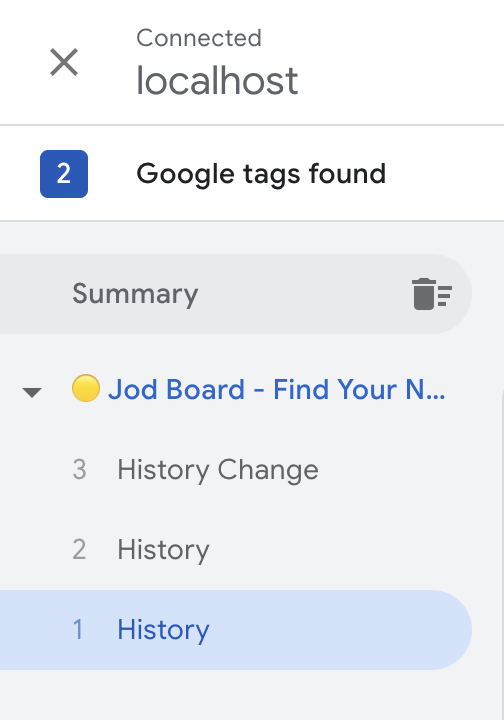
The API calls are in order:
// 1 History
dataLayer.push({ event: "gtm.historyChange", .. })
// 2 History
dataLayer.push({ event: "gtm.historyChange-v2", .. })
// 3 History Change
gtag("event", "page_view", {
This is correct behaviour according to Opus 4.5:
┌─────────────────────────────────────────────────────────────────────────┐
│                    GTM EVENT → TRIGGER → TAG FLOW                       │
├─────────────────────────────────────────────────────────────────────────┤
│                                                                         │
│   User clicks link                                                      │
│        │                                                                │
│        ▼                                                                │
│   React Router: history.pushState()                                     │
│        │                                                                │
│        ▼                                                                │
│   ┌─────────────────────────────────────────────────────────────────┐   │
│   │  GTM DETECTS THE PUSHSTATE                                      │   │
│   │                                                                 │   │
│   │  Pushes TWO events to dataLayer:                                │   │
│   │                                                                 │   │
│   │  #1: gtm.historyChange      ← Legacy event (backwards compat)   │   │
│   │  #2: gtm.historyChange-v2   ← Current event (triggers use this) │   │
│   │                                                                 │   │
│   └─────────────────────────────────────────────────────────────────┘   │
│        │                                                                │
│        │  These are TRIGGER EVENTS (inputs)                             │
│        │  They don't send data to GA4 themselves                        │
│        │                                                                │
│        ▼                                                                │
│   ┌─────────────────────────────────────────────────────────────────┐   │
│   │  GTM EVALUATES TRIGGERS                                         │   │
│   │                                                                 │   │
│   │  "History Change" trigger matches gtm.historyChange-v2 ✓        │   │
│   │                                                                 │   │
│   └─────────────────────────────────────────────────────────────────┘   │
│        │                                                                │
│        ▼                                                                │
│   ┌─────────────────────────────────────────────────────────────────┐   │
│   │  GTM FIRES ASSOCIATED TAGS                                      │   │
│   │                                                                 │   │
│   │  #3: GA4 Tag fires → gtag("event", "page_view", {...})          │   │
│   │                                                                 │   │
│   │  This is the TAG (output) - actually sends data to GA4          │   │
│   │                                                                 │   │
│   └─────────────────────────────────────────────────────────────────┘   │
│                                                                         │
└─────────────────────────────────────────────────────────────────────────┘
Why Two History Events?
| Event | Purpose |
|---|---|
gtm.historyChange | Legacy - For old GTM containers/triggers created before v2 |
gtm.historyChange-v2 | Current - The one your "History Change" trigger listens to |
GTM fires both for backwards compatibility. You can ignore gtm.historyChange (#1).
The Key Insight: Events vs Tags
| What | Role | Sends to GA4? |
|---|---|---|
#1 gtm.historyChange | Trigger event (input) | No |
#2 gtm.historyChange-v2 | Trigger event (input) | No |
#3 page_view | Tag execution (output) | Yes ✓ |
#1 and #2 are inputs that GTM uses to decide which tags to fire. #3 is the output - the actual data being sent to GA4.
Your Setup is Working Correctly ✓
The fact that you see:
gtm.historyChange-v2withgtm.triggers: "8"(indicating a trigger matched)page_viewbeing sent to GA4 with correctpage_locationandpage_referrer
Means everything is configured properly. Your SPA navigation is being tracked!