Checking Rails Setup
VSCode settings.json
These are the relevant settings from Ali's local for Ruby.
If you are copy-pasting, please ensure you know what you are doing.
- you're expected to understand the different settings in the tools that you use, especially VSCode.
{
  // Editor Ruby
  "[ruby]": {
    "editor.defaultFormatter": "Shopify.ruby-lsp", // Use the Ruby LSP as the default formatter
    "editor.insertSpaces": true, // Use spaces and not tabs for indentation
    "editor.formatOnSave": true,
    "editor.formatOnType": true, // Enable formatting while typing
    "editor.semanticHighlighting.enabled": true, // Enable semantic highlighting
    "editor.tabSize": 2, // Use 2 spaces for indentation
  },
  // Ruby LSP
  "rubyLsp.rubyVersionManager": {
    "identifier": "asdf"
  },
  "rubyLsp.indexing": {
    "includedPatterns": [
      "**/app/shared/**/*.rb"
    ]
  },
  "rubyLsp.linters": [
    "rubocop_internal"
  ],
  "rubyLsp.enabledFeatures": {
    "codeActions": true,
    "diagnostics": true,
    "documentHighlights": true,
    "documentLink": true,
    "documentSymbols": true,
    "foldingRanges": true,
    "formatting": true,
    "hover": true,
    "inlayHint": true,
    "onTypeFormatting": true,
    "selectionRanges": true,
    "semanticHighlighting": true,
    "completion": true,
    "codeLens": true,
    "definition": true,
    "workspaceSymbol": true,
    "signatureHelp": true,
    "typeHierarchy": true,
    "references": true
  },
  // Settings for all add-ons
  "rubyLsp.addonSettings": {
    // Settings for the Rails add-on
    "Ruby LSP Rails": {
      // Enable prompt for pending migrations
      "enablePendingMigrationsPrompt": true
    }
  },
}
Rails Autocomplete
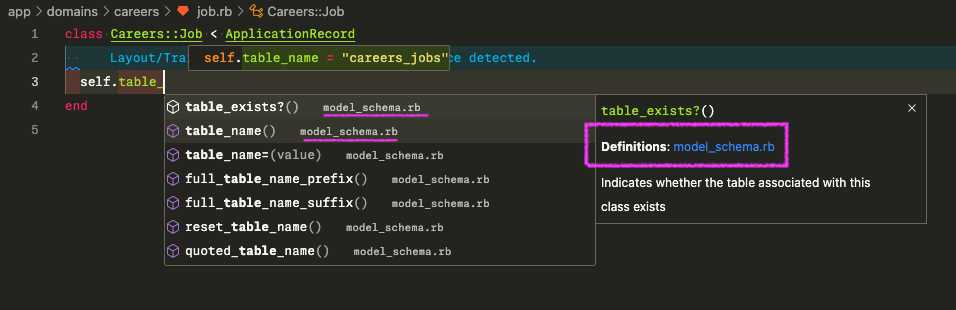
Here, we are checking if we can get auto-complete for methods in the Rail's method.
We are setting the attribute of ActiveRecord table_name by typing "table_":
- a dropdown will appear showing you all the different functions that start with
table_
If you see this, ruby-lsp is setup correctly with the Rails framework.
Custom class autocomplete
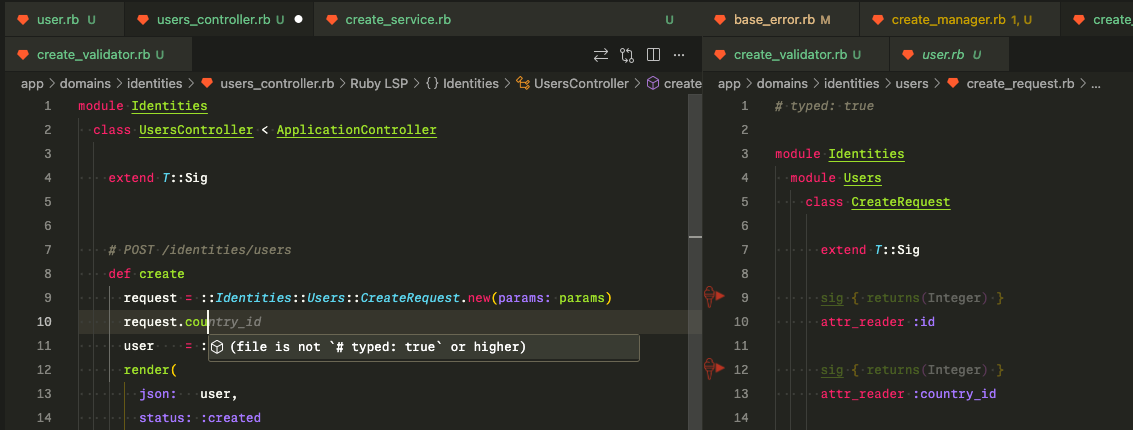
In this example, we have a plain old ruby object (PORO) Identities::Users::CreateRequest with some attributes.
If you implemented types on the attributes of the PORO, you should get auto-suggestions on the attributes of the class while using it somewhere else.
This will only work if you have added typed: true to the top of both files.
If you do not, you will see the message in the hover popup.
file is not '# typed: true' or higher
Auto-format
Here, indentation of the 2nd line has_many :applications is incorrect
class User
has_many :applications
end
If you save the file, it should automatically format to get:
class User
  has_many :applications
end
Go to definition
You could be able to ALT-Click/OPT-Click a class, and vscode should navigate to the file.