index
Deploying Our Rails API with Kamal & GitHub Actions
This guide provides a complete walkthrough of our standardized process for deploying the Rails API. By using Kamal and GitHub Actions, we automate our deployments to ensure they are fast, reliable, and consistent.
The goals of this process are:
-
Zero Downtime
- Users will not experience interruptions during deployments.
-
Consistency
- Every deployment follows the exact same automated steps.
-
Safety
- The process includes automated checks, and failed deployments are automatically halted.
-
Flexibility
- Engineers can easily deploy feature branches to a dedicated QA environment for testing.
The Big Picture: CI/CD Flow This diagram illustrates the entire process, from a developer pushing code to the application running on our servers.
Core Concepts
Kamal
- A tool that takes our application (packaged in a Docker container) and deploys it to our servers.
- It handles everything from starting/stopping containers to running migrations and ensuring zero downtime.
GitHub Actions
- Our automation engine.
- It listens for events (like a push to the main branch) and runs a pre-defined workflow, which includes testing our code, building it, and telling Kamal to deploy it.
Bastion Host (ProxyJump)
- Our application servers live in a private network for security.
- We cannot access them directly from the internet.
- The HAProxy server acts as a secure, public-facing gateway or "bastion".
- Our GitHub Actions workflow connects to the bastion via SSH, and then "jumps" from there to the private app servers.
Step 1: Infrastructure & Security Groups
Before you begin, ensure the AWS infrastructure is set up correctly.
HAProxy Server: A single EC2 instance in a public subnet. This will serve as both our load balancer and our SSH Bastion Host.
Application Servers:
- One EC2 instances for Production in a private subnet (jodapp.prod.api)
- One EC2 instance for QA in a private subnet. (jodapp.prod.qa)
Security Groups:
haproxy-sg (for the HAProxy/Bastion server):
- Inbound TCP/443: from 0.0.0.0/0 (Public HTTPS traffic).
- Inbound TCP/22: from GitHub Actions IP Ranges (Allows our CI/CD to connect securely).
private-subnet-sg (for all private app servers):
- Inbound TCP/80: from haproxy-sg (Allows HAProxy to forward traffic to the app).
- Inbound TCP/22: from haproxy-sg (Allows the Bastion to SSH into the app servers).
Step 2: SSH Key & GitHub Configuration
We need to configure GitHub with the credentials and variables required for deployment.
Generate a new SSH Key
On your local machine, run this command. Do not add a passphrase.
ssh-keygen -t ed25519 -C "kamal-deploy-key" -f ./kamal_deploy
This creates
kamal_deploy(private key)kamal_deploy.pub(public key)
Add the Public Key to Servers:
Copy the content of kamal_deploy.pub. SSH into the following servers and paste the key into the ~/.ssh/authorized_keys file for your deployment user (e.g., ubuntu or deploy):
- The HAProxy/Bastion server.
- All Production app servers.
- The QA app server.
Configure GitHub Secrets & Variables:
- Navigate to your GitHub repository: Settings > Secrets and variables > Actions.
- Create Secrets (for sensitive data):
| environment secret name | description |
|---|---|
| KAMAL_SSH_KEY | Paste the entire content of the kamal_deploy (private key) file. |
| RAILS_MASTER_KEY | Your Rails application's master key. |
| Create Variables (for non-sensitive data): |
| environment variable name | description |
|---|---|
| BASTION_HOST | The public IP address of your HAProxy/Bastion server |
| DOCKER_IMAGE | jod-app/jodapp-api or jod-app/jodapp-web |
Step 3: Kamal Configuration for Multiple Environments
We will create separate configuration files for production and QA.
Production Config (config/deploy.yml)
This is our default, complete configuration for deploying to production.
# config/deploy.yml
# The service name is used for container names, etc.
service: jodapp-api

# The Docker image for your application. We reference the GitHub Variable.
image: <%= ENV["DOCKER_IMAGE"] %>

# Credentials for GitHub Container Registry
registry:
  server: ghcr.io
  # When using environment variables for credentials, we use ERB to directly
  # embed the value. Kamal interprets lists under 'username' or 'password'
  # as names of secrets to look up, not environment variables.
  username: "<%= ENV['GITHUB_ACTOR'] %>"
  password: "<%= ENV['GITHUB_TOKEN'] %>"

# Server configuration for the 'web' role.
servers:
  web:
    - "10.0.150.112" # jodapp.prod.api

# SSH settings for connecting to servers.
ssh:
  config: true # load ~/.ssh/config
  user: ubuntu
  port: "22"
  log_level: debug


# Configuration for kamal-proxy that Kamal manages on each server.
# Since we terminate SSL at HAProxy, kamal-proxy forwards traffic to the app container.
proxy:
  app_port: 80 # thruster port (dockerfile runs rails with thurster)
  ssl: false
  healthcheck:
    path: /up
    timeout: 2
    interval: 2

# Mount local host directories into the container for persistent storage.
# This is essential for things like file uploads with Active Storage.
volumes:
  - "/rails/jodapp-api/storage:/rails/storage"

# Environment variables injected into the container.
env:
  secret:
    - RAILS_MASTER_KEY
  clear:
    RAILS_ENV: "production"
    RAILS_LOG_TO_STDOUT: "true"
    WEB_CONCURRENCY: "2"
    RAILS_MAX_THREADS: "5"
    # Allow to serve /public/robots.txt
    RAILS_SERVE_STATIC_FILES: "true"


# Configure the image builder
builder:
  # Build for ARM64 architecture (AWS Graviton processors)
  arch: arm64
  # Use GitHub Actions cache for faster builds
  cache:
    type: gha
QA Config (config/deploy.qa.yml)
This file overrides the production defaults for our QA environment.
# config/deploy.qa.yml
# Server configuration for the QA environment
servers:
  web:
    - "10.1.150.112" # jodapp.qa.api

# Environment variables for the Rails container running in QA.
env:
  clear:
    # Tell Rails to run in 'qa' mode.
    # Ensures rails uses the correct database and credentials
    RAILS_ENV: "qa"
    WEB_CONCURRENCY: "2"
    RAILS_MAX_THREADS: "5"
How Migrations are Handled
During a kamal deploy, Kamal checks if there are new migration files.
If so, it automatically runs bin/rails db:migrate on the primary server.
If a migration fails, the kamal deploy command will exit with an error.
- The GitHub Actions workflow will fail at this step.
Crucially, the deployment is halted before the new application code is rolled out. Your old, stable application containers will continue to run, preventing an outage. You can then fix the faulty migration and re-run the deployment.
Step 4: The GitHub Actions Workflow
This workflow handles both production and QA deployments.
Jobs
| jobs | trigger | description |
|---|---|---|
| build | any push | scan vulnerabilities with brakeman and lint with rubocop |
| deploy_qa | - builds docker image - pushes to ghcr.io -pulls image on api instance -starts the container on api instance | |
| deploy_prod | same process as deploy_qa |
Triggers
Two triggers:
- Manual QA: select branch to deploy to QA
- Automated Prod: push event from a PR to
mainbranch
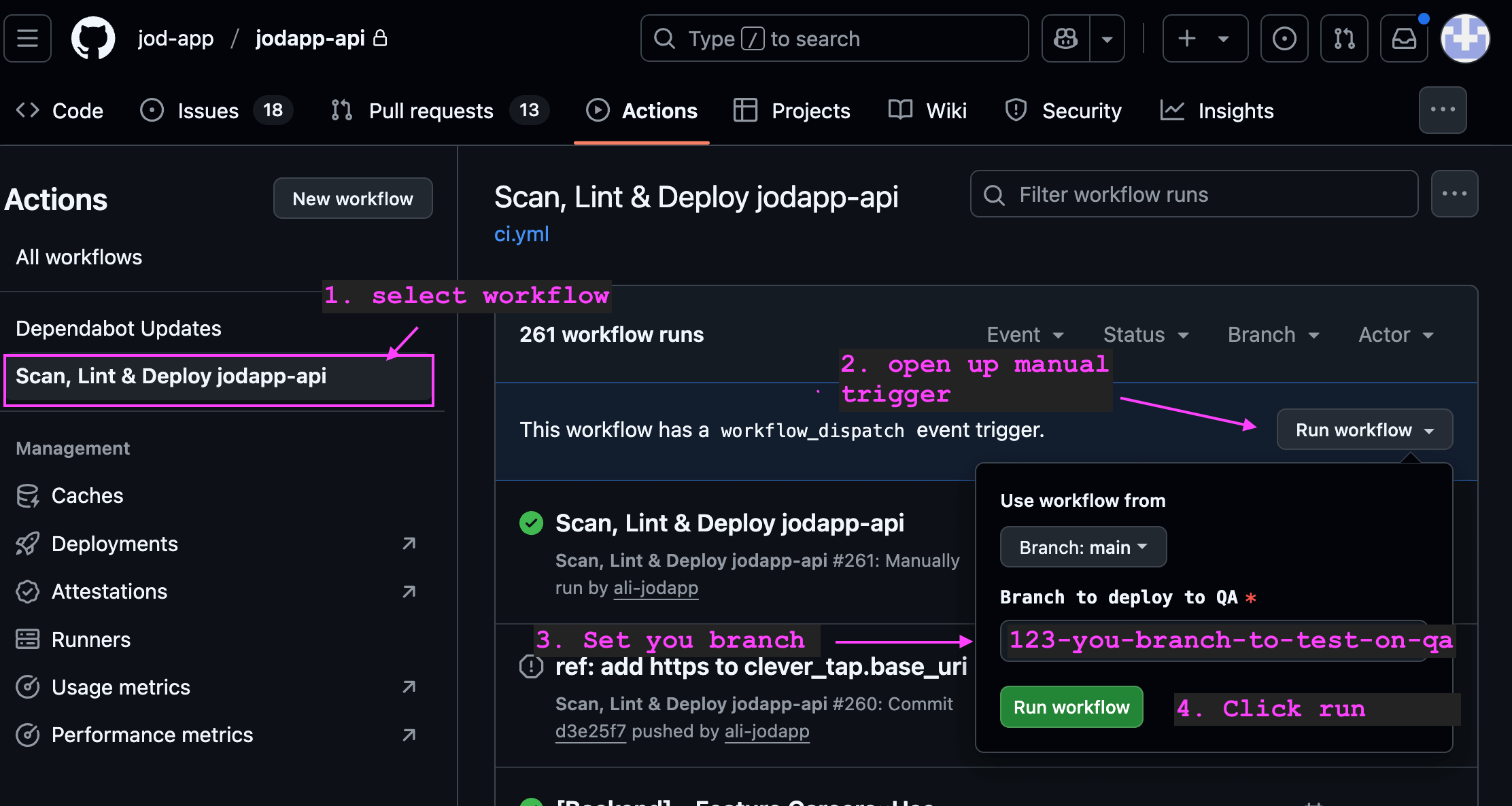
How to deploy QA
Github Workflow File
# .github/workflows/deploy.yml
name: Scan, Lint & Deploy jodapp-api

  pull_request:
on:
  push:
      branches: [ main ]
  workflow_dispatch:
    inputs:
      branch:
        description: 'Branch to deploy to QA'
        required: true
        default: 'main'

# Set secure default permissions
permissions:
  contents: read

jobs:

  # Job 1: Build, Scan, and Lint
  build:
    runs-on: ubuntu-24.04
    permissions:
      contents: read
      security-events: write  # For uploading scan results
    steps:
      - name: Checkout code
        uses: actions/checkout@v4

      - name: Set up Ruby
        uses: ruby/setup-ruby@v1
        with:
          ruby-version: .ruby-version
          bundler-cache: true

      - name: Scan for common Rails security vulnerabilities
        run: bin/brakeman --no-pager;

      - name: Lint code for consistent style
        run: bin/rubocop -f github

  # Job 2: Run tests
  # test:
  #   needs: [build]
  #   runs-on: ubuntu-latest
  #   services:
  #     postgres:
  #       image: postgres:15
  #       env:
  #         POSTGRES_USER: postgres
  #         POSTGRES_PASSWORD: postgres
  #       ports:
  #         - 5432:5432
  #       options: --health-cmd="pg_isready" --health-interval=10s --health-timeout=5s --health-retries=3
  #   steps:
  #     - name: Checkout code
  #       uses: actions/checkout@v4

  #     - name: Set up Ruby
  #       uses: ruby/setup-ruby@v1
  #       with:
  #         ruby-version: .ruby-version
  #         bundler-cache: true

  #     - name: Run tests
  #       env:
  #         RAILS_ENV: test
  #         DATABASE_URL: postgres://postgres:postgres@localhost:5432/jodapp_api_test
  #       run: |
  #         bin/rails db:prepare
  #         bin/rails test

  # Job 3: Deploy to QA Environment (Manual Trigger)
  deploy_qa:
    needs: [build]
    if: github.event_name == 'workflow_dispatch'
    runs-on:
      group: jodapp-qa
    environment:
      name: qa
      url: ${{ vars.APP_URL || '' }}
    permissions:
      contents: read
      packages: write

    steps:
      - name: "Checkout code from selected branch"
        uses: actions/checkout@v4
        with:
          ref: ${{ github.event.inputs.branch }}

      - name: "Deploy to QA"
        run: |
          echo "🚢 Deploying to QA environment..."
          kamal deploy -v --primary -d qa
        env:
          DOCKER_IMAGE: ${{ vars.DOCKER_IMAGE }}
          GITHUB_ACTOR: ${{ github.actor }}
          GITHUB_TOKEN: ${{ secrets.GITHUB_TOKEN }}
          BASTION_HOST: ${{ secrets.BASTION_HOST }}
          KAMAL_SSH_KEY: ${{ secrets.KAMAL_SSH_KEY }}
          RAILS_MASTER_KEY: ${{ secrets.RAILS_MASTER_KEY }}

  # Job 4: Deploy to Production Environment (Push to main)
  deploy_production:
    needs: [build]
    if: github.event_name == 'push' && github.ref == 'refs/heads/main'
    runs-on:
      group: jodapp-prod # Use a dedicated runner group for production
    environment:
      name: production
      url: ${{ vars.APP_URL || '' }}
    permissions:
      contents: read
      packages: write
    steps:
      - name: "Checkout main branch"
        uses: actions/checkout@v4

      - name: "Deploy to Production"
        run: |
          echo "🚢 Deploying to Production environment..."
          kamal deploy -v --primary
        env:
          DOCKER_IMAGE: ${{ vars.DOCKER_IMAGE }}
          GITHUB_ACTOR: ${{ github.actor }}
          GITHUB_TOKEN: ${{ secrets.GITHUB_TOKEN }}
          BASTION_HOST: ${{ secrets.BASTION_HOST }}
          KAMAL_SSH_KEY: ${{ secrets.KAMAL_SSH_KEY }}
          RAILS_MASTER_KEY: ${{ secrets.RAILS_MASTER_KEY }}
How to Deploy
Deploying to Production This is fully automated. Simply merge your approved feature branch into the main branch. GitHub Actions will automatically trigger the workflow and deploy to production.
Deploying a Feature Branch to QA Any engineer can deploy their branch to QA for manual testing.
Go to the Actions tab in the GitHub repository.
In the left sidebar, click on the Deploy Rails API workflow.
You will see a message: "This workflow has a workflow_dispatch event trigger." Click the Run workflow button on the right.
A dropdown will appear. In the Branch to deploy to QA text box, enter the name of your feature branch (e.g., feature/new-user-endpoint).
Click the green Run workflow button.
The workflow will now run, checking out your specific branch and deploying it to the QA server.
Rails Configurations
It's important to update config.hosts in production.rb and qa.rb
Since docker network will be receiving requests from haproxy, and then forwarding it to the rails docker container, we will need to tell rails to allow the request.
  # Enable DNS rebinding protection and other `Host` header attacks.
  # In our AWS setup: Internet → HAProxy (public) → Rails (private)
  config.hosts = [
    # External domains (preserved by HAProxy)
    'jodapp.com',
    /.*\.jodapp\.com/,

    # HAProxy health checks and internal requests
    /^[a-f0-9]{12}:3000$/,  # Docker container hostnames (12-char hex)
    /^10\./,                # AWS VPC private network (10.x.x.x)
    '127.0.0.1:3000',       # Localhost for container health checks
    'localhost:3000'        # Local health checks
  ]